Scenario One: Organized Ms. X
A group of teachers wants to work together on unit plans. The department chair creates a folder and gives each of her colleagues edit rights to the folder. After all, she doesn't want to have to change permissions on every individual file.
Along comes Ms. X who is new to the Googleverse. She has her very own organizational structure and being a very organized person, she wants to put her lesson plans into the folders she has created for each of her units throughout the year, so, she drags each of those lesson plans out of the disorganized mess of a folder created by her department chair into her own organizational structure.
You know what's next. UH OH. All of those materials have now "disappeared" from the folder where they once lived---the folder that gave the entire team the ability to work together on the files.
Scenario Two: Upwardly Mobile Mr. Y
Mr. Y is a part of the same team as the department chair and Ms. X described above. He is always looking for his next coaching position in a bigger district with a better football team. (Sorry for the stereotype Mr. Y.) After school ends...during the month of July, he finally finds his dream job and his district releases him from his contract so that he can take it.
Mr. Y has created each of the files in the first 9 weeks folder of this team. By the end of July, his account with the district has been automatically deleted. His team comes back to school in August to find the first 9 weeks folder containing all of their mutual work is completely empty. Turns out, Mr. Y owned all of the files within even though the entire team contributed to them. Unless the technology department can restore his files and transfer ownership, they are gone forever.
Google's official documentation describes them best . . .
Also check out this (better organized!!) video from my colleague JP Hale from Taylor ISD
IT Directors: This is the one to send to your teachers to help them learn about Team Drives before you turn it on.
*It's also not possible yet to add a file to your own Drive AND a Team Drive with the Shift+Z "trick." << Sad Trombone>>
The "hard to wrap your head around it" part comes when you start considering WHEN to create a Team Drive. For example, you'd want a Team Drive for the English Department not for First 9 Weeks Unit 1---anytime you have a new group who all needs to see a set of files, that's Team Drives time, but not necessarily with a new project, unless the new project also entails a new group. You feel me? Maybe not, this is going to take some time!
A group of teachers wants to work together on unit plans. The department chair creates a folder and gives each of her colleagues edit rights to the folder. After all, she doesn't want to have to change permissions on every individual file.
Along comes Ms. X who is new to the Googleverse. She has her very own organizational structure and being a very organized person, she wants to put her lesson plans into the folders she has created for each of her units throughout the year, so, she drags each of those lesson plans out of the disorganized mess of a folder created by her department chair into her own organizational structure.
You know what's next. UH OH. All of those materials have now "disappeared" from the folder where they once lived---the folder that gave the entire team the ability to work together on the files.
Scenario Two: Upwardly Mobile Mr. Y
Mr. Y is a part of the same team as the department chair and Ms. X described above. He is always looking for his next coaching position in a bigger district with a better football team. (Sorry for the stereotype Mr. Y.) After school ends...during the month of July, he finally finds his dream job and his district releases him from his contract so that he can take it.
Mr. Y has created each of the files in the first 9 weeks folder of this team. By the end of July, his account with the district has been automatically deleted. His team comes back to school in August to find the first 9 weeks folder containing all of their mutual work is completely empty. Turns out, Mr. Y owned all of the files within even though the entire team contributed to them. Unless the technology department can restore his files and transfer ownership, they are gone forever.
Google Team Drives solves two enormous Google Drive issues that have plagued us since we became dependent on collaboration and the cloud.
Google's official documentation describes them best . . .
Google Team Drives are shared spaces where teams can easily store, search, and access their files anywhere, from any device.
Unlike files in My Drive, files in Team Drive belong to the team instead of an individual. Even if members leave, the files stay exactly where they are so your team can continue to share information and get work done.
Note: Team Drives is available on G Suite Enterprise, G Suite Business, or G Suite Education editions. If you can’t use Team Drives, contact your administrator.
Want to take a look at how to create a Team Drive and learn more about what they are? Watch the video below!
Also check out this (better organized!!) video from my colleague JP Hale from Taylor ISD
IT Directors: This is the one to send to your teachers to help them learn about Team Drives before you turn it on.
Interesting aspects of Team Drives:
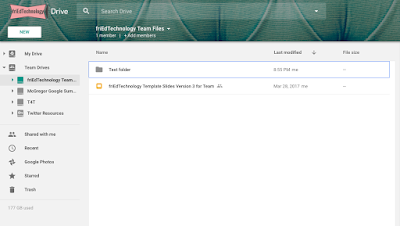
*At press time, you cannot change the permissions of objects inside the Team Drive. I wonder if this will be possible in the future?
- They have themes! Much like the current version of Google Forms.

*At press time, you cannot change the permissions of objects inside the Team Drive. I wonder if this will be possible in the future?
*It's also not possible yet to add a file to your own Drive AND a Team Drive with the Shift+Z "trick." << Sad Trombone>>
The "hard to wrap your head around it" part comes when you start considering WHEN to create a Team Drive. For example, you'd want a Team Drive for the English Department not for First 9 Weeks Unit 1---anytime you have a new group who all needs to see a set of files, that's Team Drives time, but not necessarily with a new project, unless the new project also entails a new group. You feel me? Maybe not, this is going to take some time!
Learn even more about Team Drives in the G Suite Learning Center here.